
Track 02 · UI/UX Design
UI/UX Design
Interfaces that feel obvious and convert. Research, design, and iterate — until the user doesn't have to think twice.
screens redesigned across e-commerce and SaaS projects
average conversion lift on redesigned landing pages
design systems shipped with documented tokens & components
Featured case
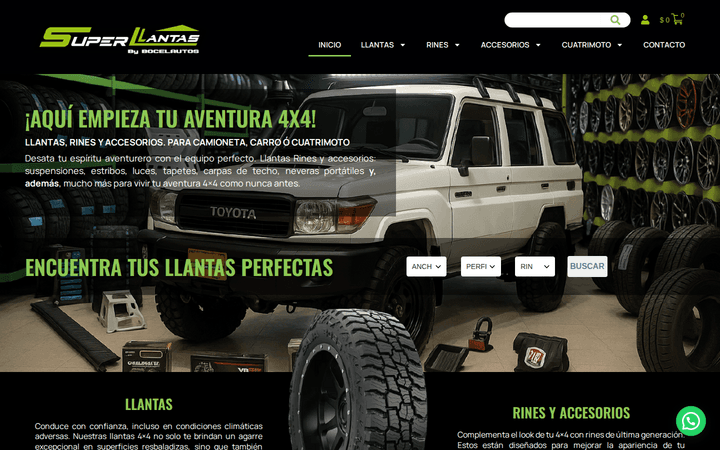
Superllantas by Socelautos
Storefront + product system for an off-road tire retailer, with synced inventory and visual filters by width, profile, and rim.
See the full case study →What I bring to the table
UX Research
User interviews, surveys, usability testing, and competitive analysis. I dig into real behavior so the design follows from evidence, not assumptions.
User Flows & Wireframes
End-to-end flows that make the next step obvious. Wireframes that lock down structure before pixels take over.
Interface Design
Production-ready UI in Figma with type, color, and spacing systems. Components that hold up at any screen size.
Conversion Optimization
Every screen has a job. I iterate on copy, layout, and CTA hierarchy so the path to conversion is short and obvious.
Design Systems
Tokens, components, and documentation so design and engineering speak the same language. Less drift, faster shipping.
Usability Testing
Moderated and unmoderated sessions. Real users, real tasks, real metrics. I turn findings into a backlog your dev team can actually act on.
How I work
Five steps, every project. The same rhythm whether the deliverable is a one-screen fix or a full product redesign.
User + business
I start by understanding the user and the business at the same time — neither one matters without the other. Empathy for the customer, sharp eye for the numbers.
Map the flow
Once I've mapped the journey and locked the flow, I move fast on wireframes. Cheap to change, expensive to skip.
System first
Visual design comes after the structure is solid. I build a clear type and spacing system so screens feel consistent without being repetitive.
Test with five
Every interface gets tested. Five users catch 85% of usability problems, and the rest gets folded into the next sprint.
Past handoff
Design doesn't stop at handoff. I sit with engineering, review every PR, and tune the live product when real-world data comes in.
Tools I work with
- Figma
- Maze
- Hotjar / Microsoft Clarity
- Notion / Confluence
- Google Analytics 4
- TypeScript & Tailwind (for design handoff and prototypes)
Frequently asked questions
Common questions about audits, redesigns, research, and handoff.
What is the difference between a UX audit and a UX redesign?
A UX audit is a written report: what is wrong, why it is wrong, what to change, and in what order. You hand it to your dev team (or to me) and they implement. A UX redesign is the same analysis plus a fully designed replacement in Figma that gets implemented directly. Most clients start with the audit, see the value, then move to the redesign.
How long does a UX redesign take?
A focused landing page redesign ships in 1 to 2 weeks. A full app redesign (5 to 20 key screens, design system, prototype, handoff) ships in 3 to 6 weeks. The audit before the redesign adds another 1 to 2 weeks. Rushing past those numbers is how you get redesigns that look pretty but do not actually move the metrics you said you cared about.
Do you do user research, or just design from best practices?
Both, depending on the budget. For most projects, a research round (5 to 8 user interviews + a synthesis) doubles the cost but also doubles the chance the redesign actually changes behavior. For smaller projects, I skip the interviews and design from analytics + session recordings + heuristic best practice. The call is yours; I will recommend the option that fits the risk.
What tools do you work in?
Figma for design, FigJam for whiteboarding, Maze or Useberry for unmoderated usability tests, Hotjar or PostHog for session recordings and heatmaps, Notion for written reports and design systems documentation. I do not use Sketch, Adobe XD, or any tool that locks your design files into a vendor format.
Can you hand off the design to my existing development team?
Yes. The handoff includes a Figma file with auto-layout, a documented design system (colors, type, spacing, components), a prototype for the flows that need to feel right before build, and a recorded walkthrough. I stay available during the build for clarifications but am not the developer on your side.
What if I already have a design and just need it implemented well?
That is the simpler version of the same engagement. I push back on the Figma early — anywhere the design will not survive code, I flag it before build so we do not discover the problem mid-sprint. Then I implement against the approved Figma with weekly demos and a final QA pass.

Ready to scale without the chaos?
Stop doing by hand what AI can do in seconds. Let's map your first workflow on a 30-min call.
Book a free strategy call